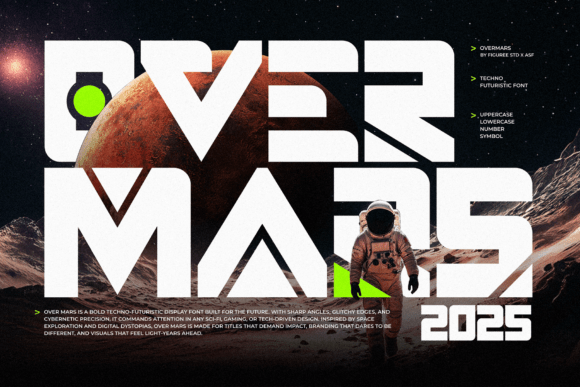
Overmars: A Bold Choice for Futuristic Design — And How to Use It Wisely
Overmars isn’t just another font—it’s a statement. With its sharp angles, sleek curves, and unmistakable digital edge, it’s designed for those who want their typography to stand out in modern digital environments. Whether you're crafting a logo, designing a UI/UX layout, or branding a tech startup, Overmars delivers a futuristic vibe that feels both confident and current. But like any design tool, it’s only as effective as the person using it. Understanding how to get the most from Overmars—without falling into common traps—can make all the difference in your final output.
What Makes Overmars Unique?
At its core, Overmars is built for digital-first design. Its clean, structured forms are inspired by techno and sci-fi aesthetics, making it ideal for gaming interfaces, digital posters, and branding for innovative startups. The font’s futuristic appeal comes from its geometric precision and high-contrast letterforms, which lend a sense of authority and modernity to any visual project.
Many designers are drawn to Overmars because of its versatility. It works well in both small interface elements and large-scale titles. However, this versatility can sometimes lead to misuse—especially when designers overlook how the font behaves in different contexts.
1. Using Overmars in the Wrong Context
While Overmars excels in futuristic and digital applications, it doesn’t always translate well to traditional or handwritten-style projects. For example, using it in a rustic wedding invitation or a vintage-style poster can create a jarring visual disconnect. The font’s sharp, mechanical look doesn’t blend well with organic or handcrafted aesthetics.
Better approach: Stick to digital, tech, or sci-fi themes. If you're designing for a more traditional or emotional tone, consider pairing Overmars with a complementary font rather than using it alone.
2. Ignoring Readability in Smaller Sizes
One of the most overlooked details with Overmars is its legibility at smaller sizes. Because of its thin strokes and angular forms, the font can become difficult to read when used in UI elements like buttons or footnotes.
Better approach: Test Overmars at various sizes before locking in your design. If you’re working with small text, consider using a bolder weight or switching to a simpler sans-serif font for improved clarity.
3. Overusing the Font Across a Project
It’s easy to fall in love with the bold look of Overmars and use it everywhere—from headlines to body copy. But doing so can lead to visual fatigue and a lack of hierarchy in your design. Typography is about balance, and Overmars is best used as an accent or display font.
Better approach: Use Overmars for headings or key visual elements, and pair it with a clean, readable font like a sans-serif for body text. This creates contrast and improves readability without sacrificing style.
4. Assuming It’s Free to Use
Another common issue is assuming Overmars is available under an open license. While some font platforms offer free trials or demo versions, the full version often comes with licensing restrictions, especially for commercial use.
Better approach: Always verify the licensing terms before using Overmars in a project. Check whether the license allows for web use, print, or app integration, and consider purchasing the appropriate package if needed.
How to Choose the Right Version of Overmars
Overmars comes in several weights and styles, and choosing the right one can significantly impact your design. Many designers overlook the importance of selecting the correct weight for their use case, which can result in poor contrast or visual imbalance.
- Thin or Light – Ideal for large headlines or digital overlays where subtlety is key.
- Regular or Medium – Great for UI text, subheadings, or poster titles.
- Bold or Black – Perfect for high-impact logos or sci-fi titles where dominance is desired.
Before downloading or purchasing, make sure the version you’re selecting includes all the characters and glyphs you need—especially if your project includes multiple languages or special symbols.
What to Check Before Downloading or Buying Overmars
Before committing to Overmars, there are a few key points to consider:
- Licensing – As mentioned earlier, ensure the license matches your intended use, especially for commercial or web-based projects.
- Character Set – Check if the font includes uppercase, lowercase, numerals, punctuation, and extended language support.
- Format Compatibility – Make sure the font is available in standard formats like OTF, TTF, or WOFF for web and print use.
- Design Suitability – Preview the font in your actual design environment to ensure it aligns with your visual goals.
Real-World Examples of Overmars Done Right
Let’s look at two real-world scenarios where Overmars shines:
- Startup Branding: A new AI-based startup used Overmars for its logo and landing page headlines. The futuristic look aligned perfectly with the brand’s innovation-driven message. They paired it with a clean sans-serif for body text, creating a balanced and modern aesthetic.
- Gaming Interface: A mobile game designer used Overmars in the game’s title screen and level selection menu. The font’s sharp lines matched the game’s high-tech theme and stood out clearly on screen, even at a distance.
In both cases, Overmars was used strategically—enhancing the design without overwhelming it.
Final Thoughts: Using Overmars Smartly
Overmars is a powerful font that can elevate your digital designs when used correctly. Its futuristic appeal makes it a favorite among designers working in tech, gaming, and creative branding. However, to get the most from it, you need to be aware of its limitations and best-use scenarios.
By avoiding common mistakes like mismatched contexts, readability issues, and licensing oversights, you’ll ensure your design not only looks great but functions well too. Always test the font in your specific use case, pair it wisely, and double-check the licensing before launching your project.
If you're looking to make a strong digital impact, Overmars is a smart choice—just make sure you're using it thoughtfully.