Beach Point: A Charming Font with Practical Appeal
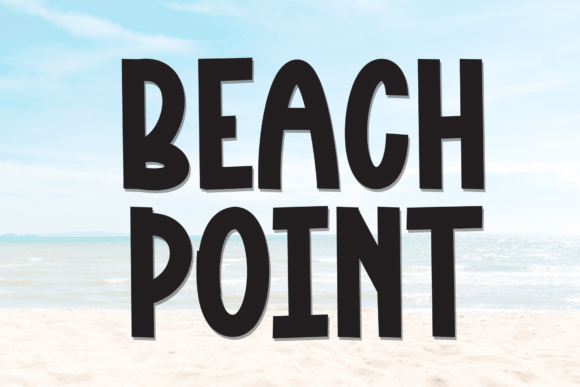
Beach Point is a sweet and friendly font that brings a natural, handcrafted feel to any design. Whether you're working on branding, social media graphics, or product packaging, Beach Point adds a touch of warmth and personality. Its unique style makes it versatile for a wide range of creative applications, from casual to semi-professional uses. However, like any design element, how you use Beach Point can significantly affect the outcome of your project.
Why People Choose Beach Point
Designers and creators often gravitate toward Beach Point because of its approachable character. It’s ideal for projects that aim to feel organic, personal, or whimsical. From wedding invitations to boutique logos, this font helps communicate a tone that's both inviting and genuine. Its hand-drawn aesthetic sets it apart from more rigid, formal typefaces, making it a go-to option for those looking to add a human touch to their visuals.
Common Mistakes When Using Beach Point
Despite its charm, Beach Point can be misused in ways that undermine its effectiveness. Here are some typical issues and how to avoid them:
1. Overusing in Formal or Technical Contexts
One of the most common mistakes is applying Beach Point in settings that require a more professional or structured tone. While it works beautifully for greeting cards or casual branding, using it in business reports, legal documents, or technical presentations can make the content appear unpolished or unprofessional.
Better approach: Pair Beach Point with a clean sans-serif or serif font for contrast. Use it for headlines or accents rather than body text in formal contexts.
2. Ignoring Readability at Small Sizes
Due to its decorative nature, Beach Point may become difficult to read when used at smaller font sizes. This can be a problem in print materials or digital content where clarity is essential.
Practical tip: Test the font at various sizes before finalizing your design. If it becomes hard to read on screens or printed pages, consider using a simpler font for body text while keeping Beach Point for larger headings.
3. Assuming It Works for Every Theme
While Beach Point is versatile, it’s not universally appropriate. Its beachy, playful vibe may clash with themes that are serious, industrial, or futuristic.
What to check: Always align your font choice with the overall message and aesthetic of your project. Ask yourself: Does this font support the tone I want to convey?
Choosing the Right Version
Beach Point comes in different weights and styles, and not all are created equal. Some versions may lack certain characters or have inconsistent spacing, which can lead to formatting issues.
- Look for complete character sets including uppercase, lowercase, numbers, and symbols.
- Check spacing and kerning to ensure text flows smoothly and doesn’t look cramped or uneven.
- Verify licensing if you plan to use the font commercially. Some free versions may restrict usage or require attribution.
Downloading and Installing Tips
Downloading Beach Point from an unreliable source can introduce problems like corrupted files, missing glyphs, or malware. Always use trusted platforms like Creative Market, MyFonts, or official font creators’ websites.
Pro tip: Before downloading, read user reviews and check the support offered by the provider. A well-supported font ensures smoother integration into your design workflow.
Pairing Beach Point with Other Fonts
Many designers struggle with font pairing, especially when combining a stylized font like Beach Point with more neutral options. The key is balance—don’t let one font overpower the other.
- Choose a simple sans-serif like Open Sans or Montserrat to complement Beach Point’s flourishes.
- Maintain visual hierarchy by using Beach Point for headlines and a more legible font for subheadings or body text.
- Test combinations before applying them across your design to ensure readability and aesthetic harmony.
Using Beach Point in Branding
When used correctly, Beach Point can enhance brand identity, especially for lifestyle, wellness, or creative businesses. However, brands that aim for a modern or corporate image may find it too casual.
Realistic example: A boutique coffee shop might use Beach Point for menu headers to evoke a cozy, handcrafted feel. But a financial consultancy using the same font could confuse its audience and dilute its professional image.
Considering the Audience
Always think about who will be viewing your design. Beach Point may appeal to younger audiences or those who appreciate a handmade aesthetic. However, if your audience values minimalism or precision, it might not be the best fit.
Better approach: Use Beach Point selectively and test how it’s received by your target audience through surveys or A/B testing, especially in marketing materials or website design.
Final Thoughts
Beach Point is a delightful font that brings warmth and character to creative projects. When used thoughtfully, it can elevate your design and help you connect with your audience on a more personal level. However, like any design tool, it has its limitations. By understanding where and how to use it effectively, you can avoid common pitfalls and make the most of its unique charm.
Before downloading or applying Beach Point, take a moment to consider the context, audience, and overall design goals. With a bit of care and attention, this sweet and friendly font can become a valuable part of your typographic toolkit.