Supermodel: Elevating Design with Height, Elegance, and Modernity
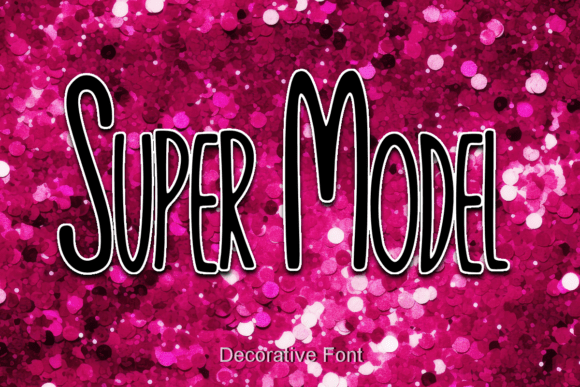
Supermodel is more than just a font—it's a deliberate design choice that communicates sophistication and modernity. With its tall, slender structure, it brings a unique visual rhythm to any project. Whether you're working on branding, editorial design, digital interfaces, or marketing materials, Supermodel's distinctive shape allows it to stand out while maintaining readability and balance. It’s not simply about aesthetics; it’s about how typography fits into a broader creative workflow and enhances the overall message.
Understanding Supermodel in the Design Workflow
Typography plays a crucial role in how information is perceived. Supermodel, with its graceful height and delicate weight, is ideal for designers looking to introduce a modern yet timeless quality to their work. It can be used at the outset of a project to define the tone or introduced later to refine visual hierarchy. Its clean structure makes it adaptable to both print and digital environments, supporting a wide range of applications from headlines to subheadings and even short-form body copy when used thoughtfully.
Before jumping into implementation, it’s helpful to consider where Supermodel fits in your creative pipeline. Is it a central typographic element in a branding package? A supporting typeface in a UI layout? Understanding its role early helps maintain consistency and ensures it complements rather than competes with other design elements.
Integrating Supermodel into Real-World Projects
When incorporating Supermodel into your design workflow, consider how it interacts with other tools and assets. For instance, if you're using Adobe Creative Suite, Figma, or Canva, Supermodel can be imported and applied with ease. Its legibility at larger sizes makes it particularly effective in titles, logos, and call-out text. Pair it with a more neutral sans-serif for body copy to create contrast and visual interest without overwhelming the reader.
- Branding: Use Supermodel for logo design or taglines to communicate elegance and modernity.
- Editorial Design: Apply it in magazine headers or pull quotes to draw attention and enhance layout dynamics.
- Web and UI: Implement it in hero sections or navigation menus to establish a refined visual tone.
- Marketing Materials: Use in social media graphics or promotional banners for a polished, upscale look.
Each of these use cases benefits from Supermodel’s ability to command attention while maintaining clarity. The key is to integrate it where it can shine without overuse. Think of it as a signature element rather than a default choice.
Preparation and Compatibility
Before implementing Supermodel, it's important to assess compatibility across platforms and devices. Most modern design software supports custom fonts, but web implementation may require additional steps such as font hosting or using a service like Google Fonts or Adobe Fonts. Always test how Supermodel renders across browsers and screen sizes, especially if you're using it in responsive web design.
Also, consider file formats and licensing. Ensure that the version of Supermodel you're using is appropriate for your intended application—whether it's for print, digital, or commercial use. Proper licensing not only protects your work but also ensures consistent rendering across different systems.
Practical Implementation Tips
Here are a few practical ways to integrate Supermodel into your creative process:
- Start with a mockup: Test Supermodel in a rough layout before committing to final designs. This helps you see how it interacts with other visual elements.
- Pair wisely: Combine Supermodel with complementary typefaces that balance its height and thin strokes. A simple sans-serif often works best.
- Adjust spacing: Due to its tall structure, tracking and leading may need fine-tuning to maintain readability and visual harmony.
- Use sparingly: Because of its distinctiveness, it’s best reserved for headlines or short text rather than long-form content.
- Review for consistency: If using Supermodel across multiple deliverables (e.g., website, print ads, social media), ensure it’s applied consistently in terms of size, weight, and color.
Long-Term Use and Workflow Integration
For professionals who regularly produce visual content, integrating Supermodel into a long-term workflow means more than just selecting a font—it’s about building a cohesive brand language. Designers, marketers, and content creators can benefit from creating reusable templates that include Supermodel in their typographic system. This not only saves time but also reinforces brand recognition.
Consider organizing your assets using a design system or style guide that includes Supermodel as a defined typographic element. This ensures that everyone involved in content creation—from copywriters to developers—understands how and when to use it. It also streamlines revisions and updates, making it easier to maintain a unified visual identity over time.
For teams working across platforms, cloud-based design tools like Figma or Adobe Cloud can help maintain consistency by allowing shared access to fonts and style presets. This reduces the risk of misapplication and ensures that Supermodel remains a polished, intentional part of the design language.
Quality Control and Refinement
As with any design element, quality control is essential. When using Supermodel, review your work at multiple stages of the process:
- During the initial concept phase, test how Supermodel contributes to the overall mood of the design.
- In the execution stage, check for proper spacing, alignment, and contrast with other elements.
- At the review phase, ensure it’s legible and appropriate for the intended audience and medium.
Don’t hesitate to revisit your typographic choices as the project evolves. Sometimes, a slight adjustment in font weight or size can significantly improve the final outcome.
Final Thoughts: Making Supermodel Work for You
Supermodel is a powerful typographic tool that, when used thoughtfully, enhances both the visual and communicative impact of your work. It bridges the gap between elegance and modernity, making it a versatile choice for professionals across industries. Whether you're designing a brand identity, crafting digital content, or producing print materials, Supermodel can elevate your output when integrated with intention and care.
By understanding its place in your workflow, preparing for compatibility, and applying it with precision, you can ensure that Supermodel becomes a consistent and valuable part of your design toolkit. Like any creative asset, its value lies not just in how it looks, but in how effectively it supports your goals and enhances the user experience.